




자료실
ANSYS Fluent 에서 Partition line 을 제거하는 방법
안녕하세요. (주)앤플럭스입니다.
ANSYS Fluent 수치해석시에 Parallel을 이용한 병렬 계산 수행 후
결과 후처리를 할 때, 보이는 Partition line 때문에 깔끔한 그림이 나오지 않는 경우가 있습니다.
오늘은 이러한 Parition line을 제거하는 방법을 설명드립니다.
ANSYS Fluent를 이용하여 간단한 예제를 해석한 후 입니다.
병렬 계산 후 ANSYS Fluent를 이용한 후처리 시에 아래 그림과 같이 Partition line이 보입니다.
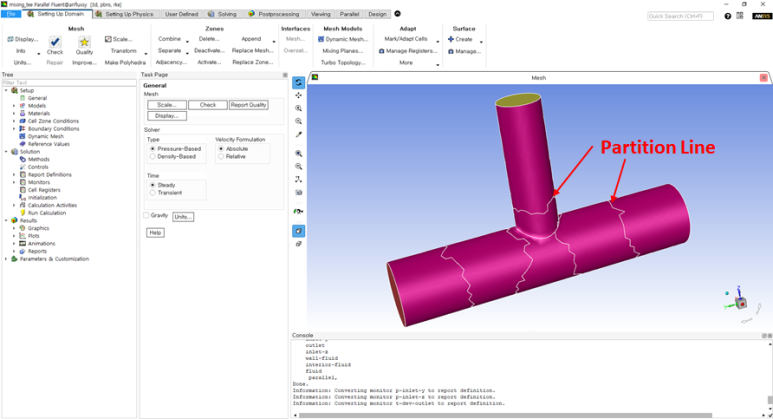
그럼 명령어를 이용해서 저 지저분한 Partition line을 지워보도록 하겠습니다.
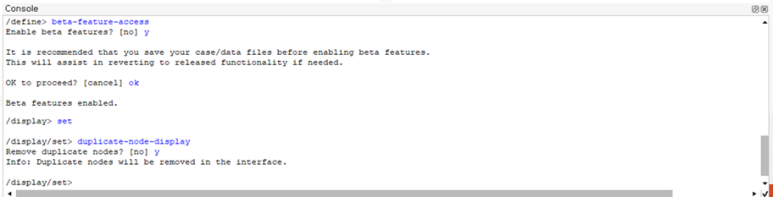
아래 Console창에 아래와 같은 명령어를 입력해줍니다.
1. Beta feature 활성화 해주기
/define> beta-feature-access
Enable beta features? [no] y
It is recommended that you save your case/data files before enabling beta features.
This will assist in reverting to released functionality if needed.
OK to proceed? [cancel] ok
Beta features enabled.
2. Interface의 중복 된 노드점 삭제해주기
/display/set> duplicate-node-display?
Remove duplicate nodes? [no] y
Info: Duplicate nodes will be removed in the interface.
명령어를 입력한 후 Console창 화면은 아래와 같습니다.
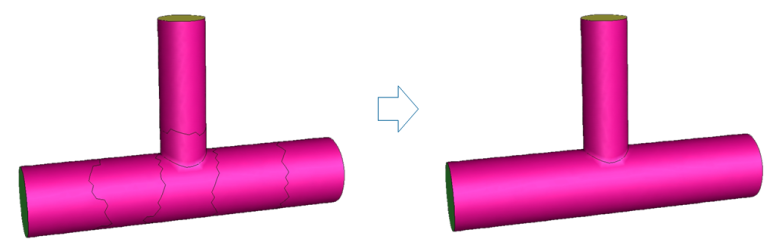
명령어를 입력해준 후 아래 그림처럼 깔-끔하게 Partition line이 제거 된 것을 확인하실 수 있습니다!
감사합니다.

COPYRIGHT © anflux, Inc ALL Rights RESERVED Designed by WebSite.co.kr.


